

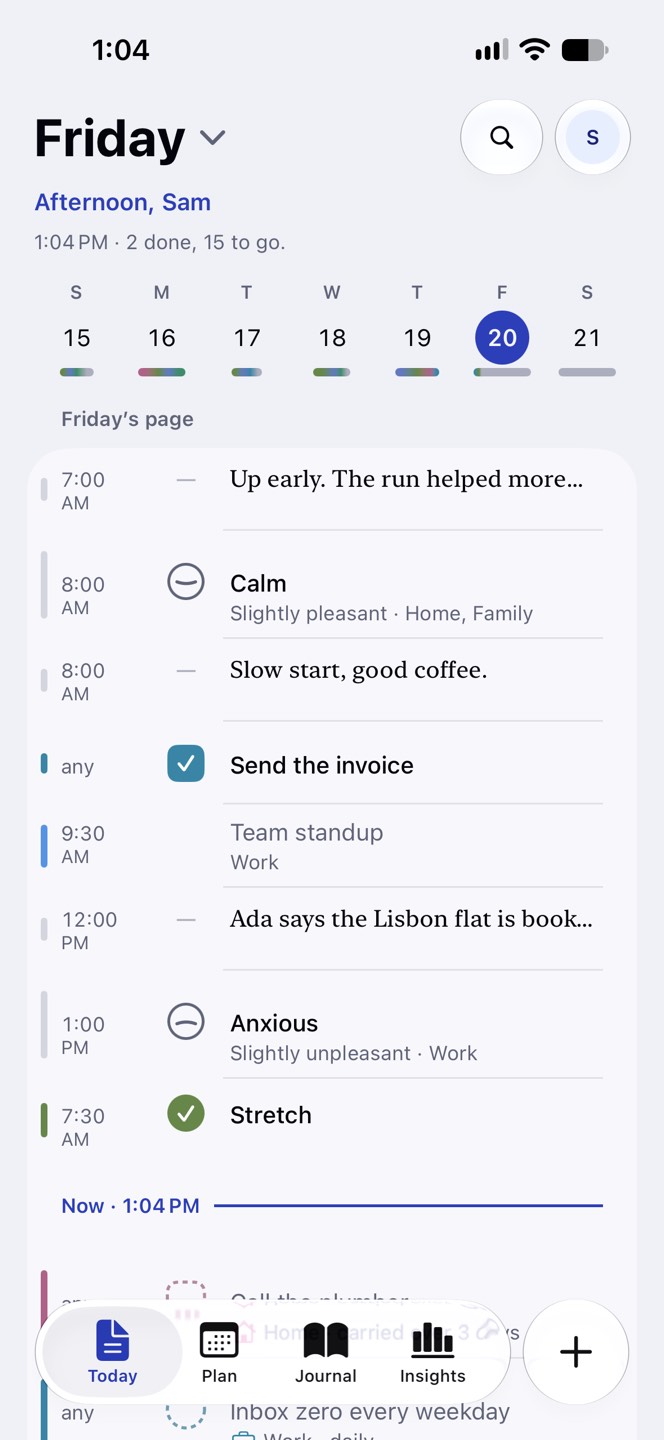
Your day, on one page.
What you do, what you plan, what you write and how you feel, kept together for each day.
On iPhone, iPad, Mac and Apple WatchWorks with Apple Health, Calendar and Siri

Outgrow a habit, Ledger takes it off your page.
Say it in your own words, Ledger detects where it fits.
Name the parts of your life, Ledger shows where your days go.
Works with Siri, say it and it gets done.
Reads your walks and workouts, marks them automatically.
Log how you feel, Ledger surfaces insights over time.
Privacy first, no sign-up, no ads, no tracking.
Ledger is in beta. Come try it.
Free on TestFlight.
Join the beta on TestFlightNeeds Apple’s free TestFlight app.
Try Ledger free for two weeks.
Then $29.99 once (US price). No subscription, no account.

On iPhone, iPad, Mac and Apple Watch.
Plan the days ahead.
Get things done.
Reflect on your day.


It keeps track,
not score.
- Plain counts, not scores.Ledger tells you what happened: 4 of 5 this week, 18 of 30 this month. Nothing is rated.
- A missed day is just a blank day.No red marks, and nothing to make up.
- Skip a day, pause a habit.Skip a day when it isn’t happening. Pause a habit while you’re away, and pick it up when you’re back.
Habits you keep,
then outgrow.
- Ledger notices when it has stuck.When you’ve kept a habit up for long enough, Ledger offers to graduate it. You decide: graduate it, change its target, or keep it as it is.
- It comes off your page.There’s nothing left to mark. Its history stays, and you can bring it back any time.
- Room for the next one.Ledger asks what’s next. It never picks a habit for you.
Your journal,
on the same page.
- It sits with your day.What you write shows on that day’s page, beside what you did and how you felt. Your evening reflection lands here too.
- Write it your way.Type it, write it by hand, or record your voice. Add photos, a drawing or a place.
- Private, and yours.It locks with Face ID, and its words are encrypted end to end. Bring your entries with you from Day One or Apple Journal.

Works with
Apple Health
and Calendar.
- Apple Health fills your habits.Steps, workouts, water, sleep and mindful minutes mark themselves. Moods can be saved to Health too, if you choose.
- Your calendar is on the page.Events sit beside your habits and tasks, so the whole day is in one place. Block out time for a task and Ledger adds it to Calendar.
- Nothing changes without you.Ledger reads only what your habits use, and never moves or edits an event.
Steps fill themselves in
A workout counts
Your calendar, on the page
The same Ledger
on every device.
- Always in step.Mark a line on one device and a moment later it’s marked on the others. It syncs through your own iCloud.
- Made for the bigger screen.On iPad and Mac, Ledger spreads out: a sidebar, more on screen at once, and menus and keyboard shortcuts on the Mac.
- On your wrist, too.Mark a line, turn the Digital Crown to set an amount, or log a mood. Add Ledger to your watch face to see what’s next.
Your data stays yours.
- Data Not Collected.Ledger collects nothing about you. That will be its privacy label on the App Store.Ledger’s privacy label on the App Store. It collects nothing about you.
- No account, no ads.There’s nothing to sign up for, and nothing is sold or shown to you.
- Your own iCloud.Your devices sync through it, and Arca Holdings can’t read it.
The rest of it.
- InsightsPatterns Ledger notices, worked out on your device.
- WidgetsToday’s lines on your Home Screen, your Lock Screen and in StandBy.
- RemindersFor any habit or task, scheduled on your device.
- TimersTime a habit, and see it running on your Lock Screen.
- Control CenterMark a habit done, log a serving or start a timer without opening Ledger.
- Siri and ShortcutsLog a habit, add a task or a mood by asking, or build it into a shortcut.
- SearchFind any habit, task or Journal entry.
- Share to LedgerSend a photo, a link or a note from any app into the Journal.
- On this daySee what you wrote on this date in past years.
- Catch upForgot to mark yesterday? Ledger offers to fill it in.
- ExportSave everything as a file whenever you like.
- LanguagesEnglish and German. The German is still a draft.
- English and GermanLedger follows your device’s language.
FAQs
What is TestFlight?
Apple’s free app for trying apps before they’re released. Install it from the App Store, then choose Join the beta on this page.
What does it cost?
Nothing while it’s in beta on TestFlight. At launch, Ledger will be free for two weeks with everything on, then Ledger Lifetime is $29.99 once. That’s the US price; the App Store shows the price for your country. There’s no subscription.
Is it a subscription?
No. Ledger is free for two weeks with everything on. After that, Ledger Lifetime is $29.99 once, and it includes future features. That’s the US price; the App Store shows the price for your country.
Will what I add during the beta carry over?
Yes. The beta is the same app that will be on the App Store, so what you add stays on your devices and in your iCloud when you update.
What if I don’t buy it?
What you wrote stays yours: you can still read and export everything.
Which devices does it work on?
iPhone, iPad, Mac and Apple Watch, with iOS, iPadOS, macOS or watchOS 26 or later.
Do my moods sync?
Moods stay on the device you log them on. On iPhone and iPad, turn on Save to Health and they’re in Apple Health too. On Apple Watch, moods are saved to Apple Health and show in Ledger on your iPhone.
Where do I get help?
On the Support page, or by email at [email protected].
Your day, on one page.
Free on TestFlight for iPhone, iPad, Mac and Apple Watch.
Join the betaFree for two weeks, then $29.99 once (US price). On iPhone, iPad, Mac and Apple Watch.